
基于Navigation 组件的 APK逆向分析

基于这个组件的apk一般内部结构如下

MainActivity (容器层)
├── 工具栏设置
├── Navigation 配置
├── FAB 按钮(提示信息)
└── 菜单处理

FirstFragment (业务层) ← 真正的加密逻辑在这里
├── UI 绑定
├── 输入框处理
└── 加密验证逻辑

一、架构特征识别

1. Navigation 组件的典型标志

1
2
3
4
// MainActivity 中的关键代码
NavController findNavController = Navigation.findNavController(this, R.id.nav_host_fragment_content_main);
AppBarConfiguration.Builder(findNavController.getGraph()).build();
NavigationUI.setupActionBarWithNavController(this, findNavController, build);

逆向时的识别要点:

  • 看到 NavController、Navigation.findNavController

  • 存在 nav_host_fragment 相关的资源 ID

  • NavigationUI 的调用

  • Activity 相对简洁,主要是配置代码

二、代码定位策略

传统单 Activity 架构 vs Navigation 架构

架构类型 业务逻辑位置 逆向重点
传统架构 直接在 Activity 中 分析 MainActivity 即可
Navigation 架构 分散在各个 Fragment 需要逐个分析 Fragment

三、遇到 Navigation 组件的 APK:

  1. MainActivity → 只看架构,不看业务逻辑
  2. res/navigation/ → 找到所有 Fragment 的名称
  3. Fragment 类 → 这才是真正的逻辑所在
  4. res/layout/fragment_.xml → 查看UI控件ID

. 理解资源绑定

1
2
this.binding.input      // 对应 layout 中的输入框
this.binding.checkFlag // 对应 layout 中的按钮

追踪点击事件

1
2
setOnClickListener()           // 按钮点击
setOnEditorActionListener() // 输入框确认

三、逆向分析步骤

1
2
3
// MainActivity.onCreate() 
// 判断应用使用了 Navigation 组件
Navigation.findNavController(this, R.id.nav_host_fragment_content_main);

MainActivity函数没啥逻辑

1
2
3
4
5
6
7
8
9
10
11
12
13
14
15
16
17
18
19
20
21
22
23
24
25
26
27
28
29
30
31
32
33
34
35
36
37
38
39
40
41
42
43
44
45
46
47
48
49
50
51
52
53
54
55
56
57
58
59
60
61
package work.pangbai.ezmydroid;

import android.content.DialogInterface;
import android.os.Bundle;
import android.view.Menu;
import android.view.MenuItem;
import android.view.View;
import androidx.appcompat.app.AppCompatActivity;
import androidx.navigation.NavController;
import androidx.navigation.Navigation;
import androidx.navigation.ui.AppBarConfiguration;
import androidx.navigation.ui.NavigationUI;
import com.google.android.material.dialog.MaterialAlertDialogBuilder;
import com.google.android.material.snackbar.Snackbar;
import work.pangbai.ezmydroid.databinding.ActivityMainBinding;

/* loaded from: classes2.dex */
public class MainActivity extends AppCompatActivity {
private AppBarConfiguration appBarConfiguration;
private ActivityMainBinding binding;

/* JADX INFO: Access modifiers changed from: protected */
@Override // androidx.fragment.app.FragmentActivity, androidx.activity.ComponentActivity, androidx.core.app.ComponentActivity, android.app.Activity
public void onCreate(Bundle bundle) {
super.onCreate(bundle);
ActivityMainBinding inflate = ActivityMainBinding.inflate(getLayoutInflater());
this.binding = inflate;
setContentView(inflate.getRoot());
setSupportActionBar(this.binding.toolbar);
NavController findNavController = Navigation.findNavController(this, R.id.nav_host_fragment_content_main);
AppBarConfiguration build = new AppBarConfiguration.Builder(findNavController.getGraph()).build();
this.appBarConfiguration = build;
NavigationUI.setupActionBarWithNavController(this, findNavController, build);
this.binding.fab.setOnClickListener(new View.OnClickListener() { // from class: work.pangbai.ezmydroid.MainActivity.1
@Override // android.view.View.OnClickListener
public void onClick(View view) {
Snackbar.make(view, "喵喵喵,需要分析软件的代码呢,你安装了Jadx-Gui吗?", 0).setAnchorView(R.id.fab).setAction("Action", (View.OnClickListener) null).show();
}
});
}

@Override // android.app.Activity
public boolean onCreateOptionsMenu(Menu menu) {
getMenuInflater().inflate(R.menu.menu_main, menu);
return true;
}

@Override // android.app.Activity
public boolean onOptionsItemSelected(MenuItem menuItem) {
if (menuItem.getItemId() == R.id.action_settings) {
new MaterialAlertDialogBuilder(this).setTitle((CharSequence) "NewStarCTF2025").setMessage((CharSequence) "欢迎参加 NewStarCTF2025,你需要解出类似于 flag{} 的文本,并在比赛平台提交").setPositiveButton((CharSequence) "OK", (DialogInterface.OnClickListener) null).create().show();
return true;
}
return super.onOptionsItemSelected(menuItem);
}

@Override // androidx.appcompat.app.AppCompatActivity
public boolean onSupportNavigateUp() {
return NavigationUI.navigateUp(Navigation.findNavController(this, R.id.nav_host_fragment_content_main), this.appBarConfiguration) || super.onSupportNavigateUp();
}
}

Step 2: 找到导航图

  • 查找 res/navigation/*.xml 文件

  • 或在代码中搜索 Fragment 类

  • 找 res/values/strings.xml文件

Step 3: 逐个分析 Fragment

找到解密逻辑直接分析解密即可
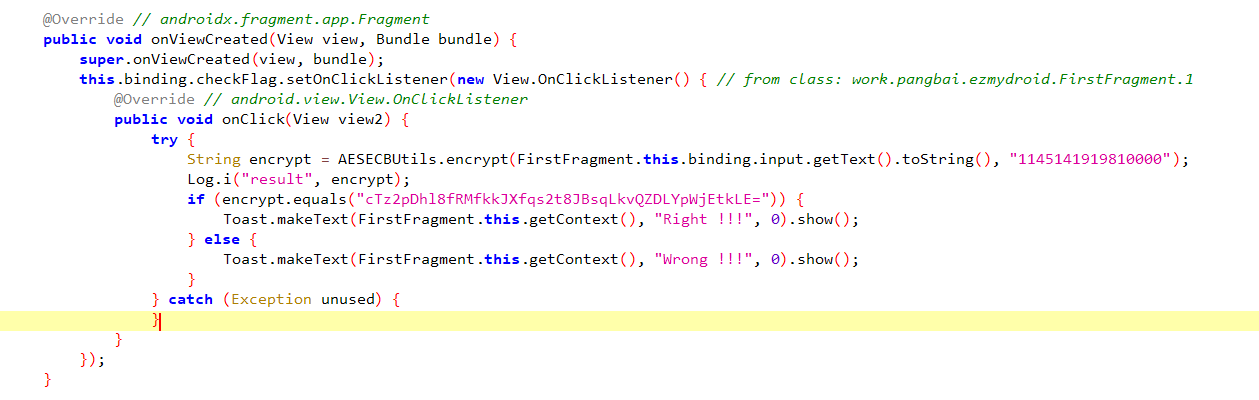
基于navigation组件的apk分析/image-20250930225224871

解密脚本

1
2
3
4
5
6
7
8
9
10
from Crypto.Cipher import AES
import base64

key = b"1145141919810000"
ciphertext = base64.b64decode("cTz2pDhl8fRMfkkJXfqs2t8JBsqLkvQZDLYpWjEtkLE=")

cipher = AES.new(key, AES.MODE_ECB)
plaintext = cipher.decrypt(ciphertext)
flag = plaintext.strip() # 去除填充
print(flag.decode())